
Riempimento con motivo
Questo riempie il livello con un motivo o una trama predefiniti che sono stati caricati in Krita tramite l’interfaccia di gestione delle risorse. I motivi possono essere un modo semplice e interessante per aggiungere consistenza al tuo disegno o dipinto, aiutando a ricreare l’aspetto di carta da acquerello, lino, tela, faesite, pietra o un numero infinito di altre opzioni. Ad esempio, se vuoi prendere un dipinto digitale e finirlo con l’aspetto che sia su tela puoi aggiungere un livello di riempimento con la trama della tela dal pacchetto di trame qui sotto e impostare l’opacità molto bassa in modo che i «fili» del motivo siano appena visibili. L’effetto è abbastanza convincente.
Puoi crearne il tuo e usare anche quelli. Per un fantastico insieme di motivi utili e ben progettati, dai un’occhiata a uno dei nostri artisti preferiti e grande amico di Krita, il pacchetto di trame gratuito di David Revoy (https://www.davidrevoy.com/article156/texture-pack-1).
- Trasforma
Added in version 4.4.
Ciò consente di impostare una serie di opzioni di trasformazione sul motivo, come ridimensionarlo o ruotarlo.
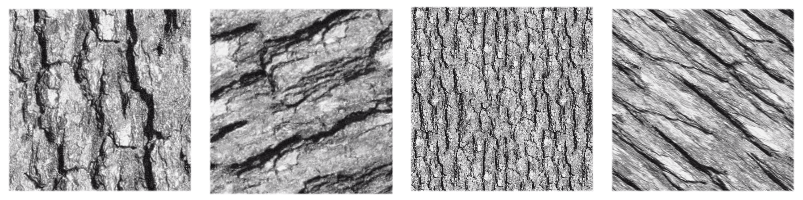
Immagine che mostra diverse trasformazioni applicate a una singolo trama.
- Allinea alla griglia dei pixel
Added in version 5.3.
Quando a un motivo viene applicata una trasformazione geometrica, gli angoli dell’immagine ripetuta potrebbero essere spostati in una nuova posizione, incluse le coordinate frazionali (sotto-pixel, non coordinate di interi). Questo è il comportamento predefinito e va bene la maggior parte delle volte. Ma vi sono casi in cui è preferibile che gli angoli terminino alle coordinate di interi. Per esempio, quando è necessaria la ripetibilità esatta con precisione del pixel. Questo risultato può essere raggiunto attivando l’opzione Allinea alla griglia dei pixel. In questo modo, è certo che gli angoli dei motivi ricadono nelle coordinate degli interi dopo la trasformazione.
Tieni presente questo allineamento riduce il numero di trasformazioni possibili (di fatto, tutte quelle trasformazioni che mappano gli angoli alle coordinate frazionali sono rimosse), la trasformazioni allineata approssimerà quella non allineata il più vicino possibile. Esiste anche la possibilità di impostare questo allineamento su un numero di ripetizioni del motivo a cui gli angoli devono essere allineati.
Questa opzione è particolarmente utile quando si lavoro con motivi piccoli, per esempio quelli utilizzati per i retini, o quando il motivo è ridotto a dimensioni piuttosto piccole, in quanto aiuta a ridurre certi artefatti come i motivi moiré.
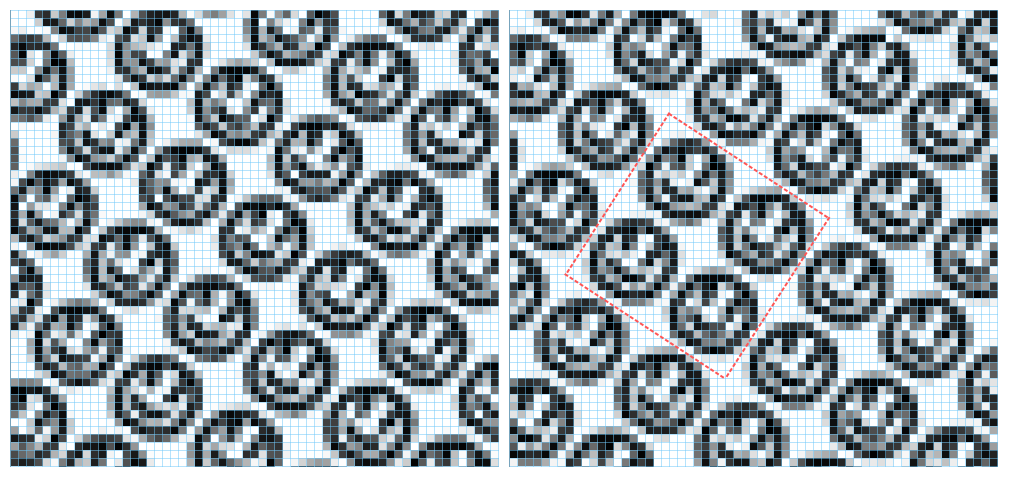
Questa immagine mostra un livello Riempimento a motivo che utilizza l’immagine di una faccina. Essa viene trasformata riducendola al 75% e ruotandola di 34 gradi. Sulla sinistra non viene applicato alcun allineamento, sulla destra l’allineamento è attivo e impostato ogni due ripetizioni, sia orizzontalmente sia verticalmente. Le linee blu sono gli indicatori della griglia dei pixel e quelli rossi indicano un blocco di due per due ripetizioni, i cui angoli sono allineati alla griglia dei pixel. Nota che, quando l’allineamento è attivo il blocco viene ripetuto esattamente attraverso l’immagine; quando l’allineamento è disattivo ogni istanza del motivo viene resa in modo leggermente differente.