
パターン塗りつぶし
リソース管理から通して Krita に読み込まれた定義済みのパターンやテクスチャでレイヤーを塗りつぶします。パターンは絵に追加するシンプルで面白いテクスチャになることがあり、水彩紙、リネン、キャンバス、ハードボード、石絵や他の限りない選択肢のようにすることができます。例えばデジタルペイントをキャンバスに描いたような仕上がりにしたい場合、塗りつぶしレイヤーから下にあるテクスチャパックのキャンバステクスチャを追加し、不透明度をとても低くすることでパターンの"筋"のみがかろうじて見えるようになります。説得力のあるエフェクトです。
ご自身で作って使うこともできます。便利でよくデザインされたパターンのセットは私たちお気に入りのアーティストであり Krita の友達の、David Revoy 氏のフリーテクスチャパック(https://www.davidrevoy.com/article156/texture-pack-1)を試してください。
- 変形
Added in version 4.4.
拡大縮小や回転といった、変形オプションをパターンに設定することができます。
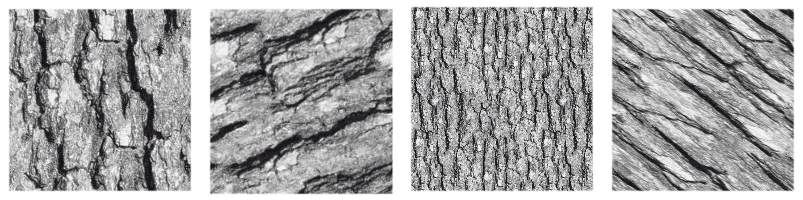
一つのテクスチャに変形をいくつも適用させた画像です。
- Align to pixel grid
Added in version 5.3.
When a geometric transformation is applied to a pattern, the corners of the repeated image may be displaced to any new position, including fractional coordinates (sub-pixel, non integer coordinates). This is the default behavior and it is fine most of the times. But there are times when it is desirable that the corners end up at integer coordinates. For example when exact repeatability with pixel accuracy is needed. This can be achieved by checking the align to pixel grid option. By doing so, the pattern corners are ensured to fall at integer coordinates after the transformation.
Keep in mind that this alignment reduces the number of possible transformations (in fact, all those transformations that map the corners to fractional coordinates are removed), but the aligned transformation will approximate the un-aligned one as close as possible. There is also the possibility of setting this alignment over a number of repetitions of the pattern the corners should be aligned.
This option is especially useful when dealing with small patterns, for example those used for screentones, or when the pattern is scaled down to be really small, since it helps reducing some artifacts like moiré patterns.
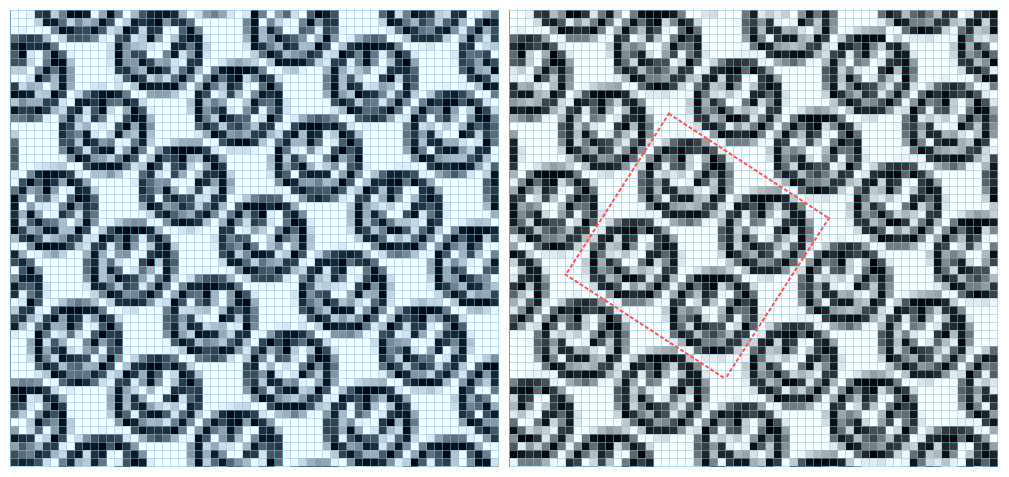
This image shows a pattern fill layer that uses a smiley face image. It is being transformed by scaling to 75% and rotating 34 degrees. On the left no alignment is being applied and on the right the alignment is active and set to every two repetitions, both horizontally and vertically. The blue lines are indicators of the pixel grid and the red ones mark a block of two by two repetitions whose corners are aligned to the pixel grid. Note that, when the alignment is on, then that block is repeated exactly through the image, but when it is off, every instance of the pattern is rendered slightly different.