
Vulling met patroon
Dit vult de laag met een voorgedefinieerd patroon of textuur die in Krita is geladen via het interface Hulpbronnenbeheer. Patronen kunnen een eenvoudige en interessante manier zijn om textuur aan uw tekening of schilderij toe te voegen, en daarmee u helpen om het uiterlijk van waterverfpapier, linnen, canvas, hardboard, steen of een oneindig aantal andere opties. Als u bijvoorbeeld een digitaal schilderij wilt nemen en het af wilt werken met het uiterlijk van wat het is op canvas, dan kunt u een Vullaag met de canvastextuur uit het pakket textuur onderaan toevoegen en de dekking heel laag instellen zodat de “draden” van het patroon net zichtbaar zijn. Het effect is zeer overtuigend.
U kunt uw eigen maken en die ook gebruiken. Voor een grootse set van goed ontworpen en bruikbare patronen bekijk u een van onze favoriete kunstenaars en een grote vriend van Krita, het vrije textuurpakket van David Revoy (https://www.davidrevoy.com/article156/texture-pack-1).
- Transformeren
Added in version 4.4.
Dit biedt het instellen van een aantal transformatie-opties op het patroon, zoals verschalen of draaien.
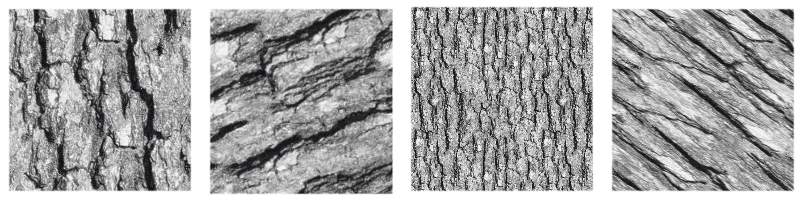
Afbeelding die verschillende transformaties toont toegepast op een enkele textuur.
- Uitlijnen op Pixelraster
Added in version 5.3.
Als een geometrische transformatie is toegepast op een patroon, dan kunnen wellicht de hoekpunten van de repeterende afbeelding naar een nieuwe positie worden verplaatst, inclusief fractionele coördinaten (sub-pixel, coördinaten met niet gehele getallen). Dit is het standaard gedrag en is meestal goed genoeg. Maar er zijn momenten dat gewenst is dat de hoekpunten op coördinaten met een geheel getal liggen. Bijvoorbeeld als exacte herhaling met exacte nauwkeurigheid nodig is. Dit kan bereikt worden door Uitlijnen op Pixelraster in te schakelen. Door dit te doen, bent u er zeker van dat de hoekpunten na de transformatie op integer coördinaten terecht komen.
Houdt wel in gedachte dat deze uitlijning het aantal mogelijke transformaties beperkt (alle transformaties die de hoekpunten op fractionele coördinaten plaatsen, worden verwijderd), maar de uitgelijnde transformatie zal de niet-uitgelijnde zo dicht mogelijk benaderen. Er is ook de mogelijkheid om bij deze uitlijning het aantal herhalingen in te stellen waarbij de hoekpunten uitgelijnd moeten worden.
Deze optie is met name handig bij de hantering van kleine patronen, bijvoorbeeld als die gebruikt worden bij screentoons, of als die heel klein worden verschaald, omdat dit helpt bij het voorkomen van artefacten zoals moiré patronen.
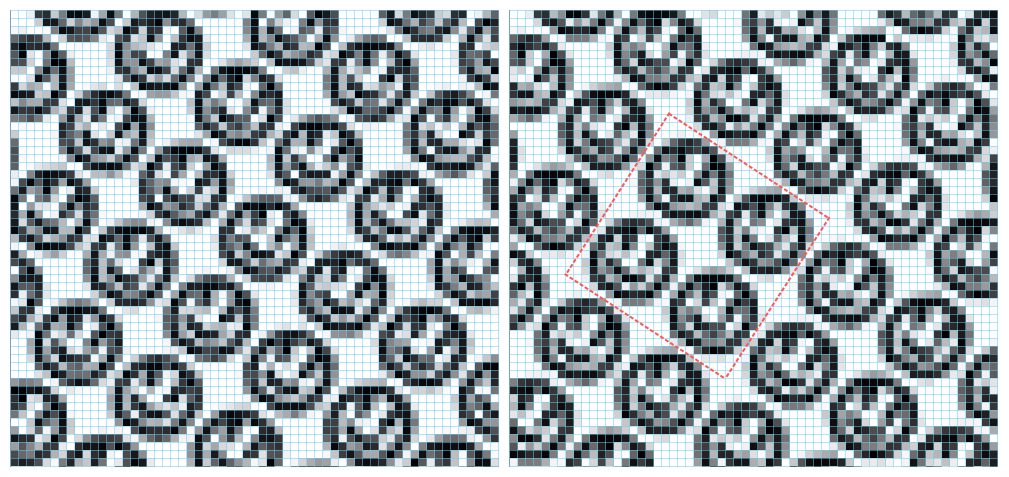
Deze afbeelding toont een vullaag met een patroon dat een afbeelding met een lachend gezicht gebruikt. Het is getransformeerd door het tot 75% te verschalen en 34 graden te roteren. Links is geen uitlijning toegepast terwijl rechts de uitlijning wel actief is en ingesteld op elke 2 herhalingen, zowel horizontaal als verticaal. De blauwe lijnen zijn een indicatie van het pixelraster en de rode markeren een blok van twee bij twee herhalingen waarvan de hoeken zijn uitgelijnd op het pixelraster. Merk op dat als de uitlijning ingeschakeld is, het blok in de afbeelding nauwkeurig wordt herhaald, maar als het uitgeschakeld is, elk exemplaar van het patroon een beetje verschillend gerenderd wordt.