
Preenchimento com Padrões
Isto preenche a camada com um padrão ou textura predefinidos que tenham sido carregados no Krita através da interface de Gestão de Recursos. Os padrões podem ser uma forma simples e interessante de adicionar texturas ao seu desenho ou pintura, ajudando a recriar a aparência de papel de tintas de água, linho, tela, cartão, pedra ou um conjunto infinito de outras opções. Por exemplo, se quiser criar uma pintura digital e terminá-la como se tivesse sido aplicada sobre tela, poderá adicionar uma camada de preenchimento com a textura Tela, no pacote de texturas abaixo e definir a opacidade muito baixa, para que os «fios» do padrão sejam apenas ligeiramente visíveis. O efeito é bastante convincente.
Poderá criar o seu próprio e usá-lo da mesma forma. Para obter um conjunto de padrões bem desenhados e úteis, consulte um dos nossos artistas favoritos e um grande amigo do Krita, o pacote de texturas gratuitas do David Revoy (https://www.davidrevoy.com/article156/texture-pack-1).
- Transformar
Added in version 4.4.
Isto permite a definição de um conjunto de opções de transformação no padrão, como a sua escala ou rotação.
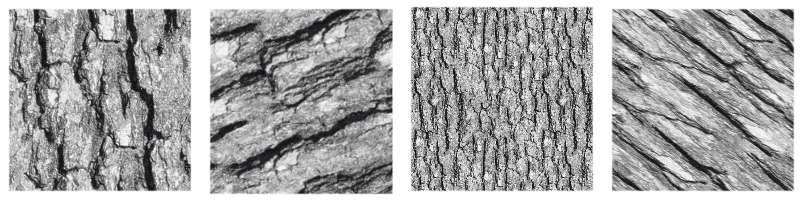
Imagem que mostra diversas transformações aplicadas a uma única textura.
- Align to pixel grid
Added in version 5.3.
When a geometric transformation is applied to a pattern, the corners of the repeated image may be displaced to any new position, including fractional coordinates (sub-pixel, non integer coordinates). This is the default behavior and it is fine most of the times. But there are times when it is desirable that the corners end up at integer coordinates. For example when exact repeatability with pixel accuracy is needed. This can be achieved by checking the align to pixel grid option. By doing so, the pattern corners are ensured to fall at integer coordinates after the transformation.
Keep in mind that this alignment reduces the number of possible transformations (in fact, all those transformations that map the corners to fractional coordinates are removed), but the aligned transformation will approximate the un-aligned one as close as possible. There is also the possibility of setting this alignment over a number of repetitions of the pattern the corners should be aligned.
This option is especially useful when dealing with small patterns, for example those used for screentones, or when the pattern is scaled down to be really small, since it helps reducing some artifacts like moiré patterns.
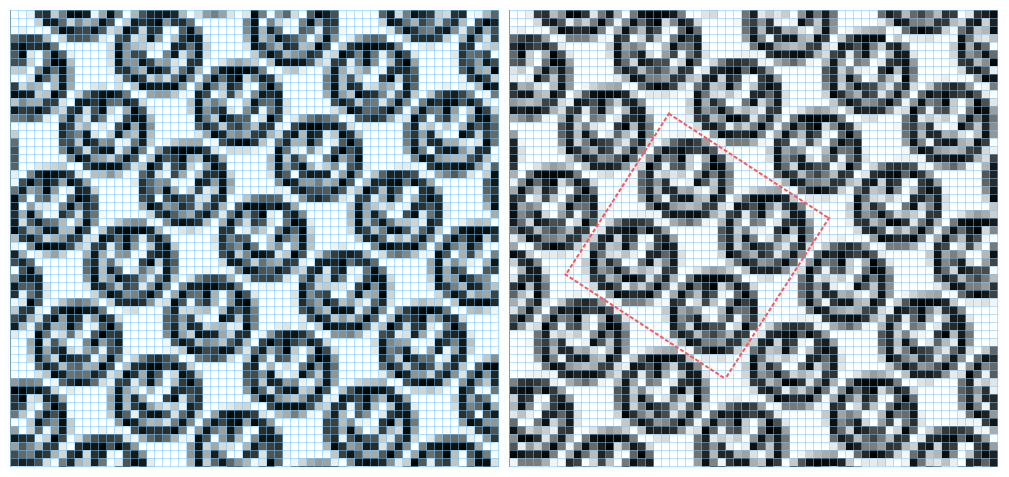
This image shows a pattern fill layer that uses a smiley face image. It is being transformed by scaling to 75% and rotating 34 degrees. On the left no alignment is being applied and on the right the alignment is active and set to every two repetitions, both horizontally and vertically. The blue lines are indicators of the pixel grid and the red ones mark a block of two by two repetitions whose corners are aligned to the pixel grid. Note that, when the alignment is on, then that block is repeated exactly through the image, but when it is off, every instance of the pattern is rendered slightly different.