
Wypełnienie wzorcem
Warstwa wypełnienia z ustawionym uprzednio wzorcem lub teksturą, która została wczytana do Krity poprzez zarządzanie zasobami. Wzorce mogą w prosty i interesujący sposób dodać teksturę do twoich rysunków i malunków, pomagając odtworzyć wygląd papieru plakatowego, lnu, płótna, płyty pilśniowej, kamienia lub inny wygląd wg nieskończonej liczby ustawień. Na przykład, jeśli chcesz wykończyć cyfrowy malunek, tak aby wyglądał jak na płótnie, to możesz dodać warstwę wypełnienia z teksturą płótna z poniższego zestawu tekstur i ustawić nieprzezroczystość na bardzo niską, tak aby „nitki” wzorca były ledwie widoczne. Wynik jest całkiem przekonujący.
Możesz także utworzyć swój własny i później go użyć. Duży zestaw dobrze stworzonych i użytecznych wzorców znajduje się w zestawie tekstur naszego ulubionego artysty i wielkiego przyjaciela Krity, Davida Revoya (https://www.davidrevoy.com/article156/texture-pack-1).
- Przekształć
Added in version 4.4.
To umożliwia ustawienie liczby ustawień przekształceń na wzorcu, takich jak jego skalowanie lub obrót.
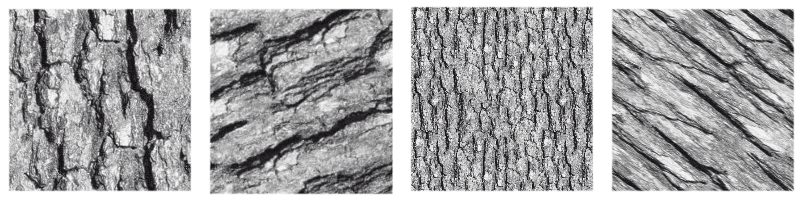
Obraz pokazujący kilka przekształceń zastosowanych do pojedynczej tekstury.
- Align to pixel grid
Added in version 5.3.
When a geometric transformation is applied to a pattern, the corners of the repeated image may be displaced to any new position, including fractional coordinates (sub-pixel, non integer coordinates). This is the default behavior and it is fine most of the times. But there are times when it is desirable that the corners end up at integer coordinates. For example when exact repeatability with pixel accuracy is needed. This can be achieved by checking the align to pixel grid option. By doing so, the pattern corners are ensured to fall at integer coordinates after the transformation.
Keep in mind that this alignment reduces the number of possible transformations (in fact, all those transformations that map the corners to fractional coordinates are removed), but the aligned transformation will approximate the un-aligned one as close as possible. There is also the possibility of setting this alignment over a number of repetitions of the pattern the corners should be aligned.
This option is especially useful when dealing with small patterns, for example those used for screentones, or when the pattern is scaled down to be really small, since it helps reducing some artifacts like moiré patterns.
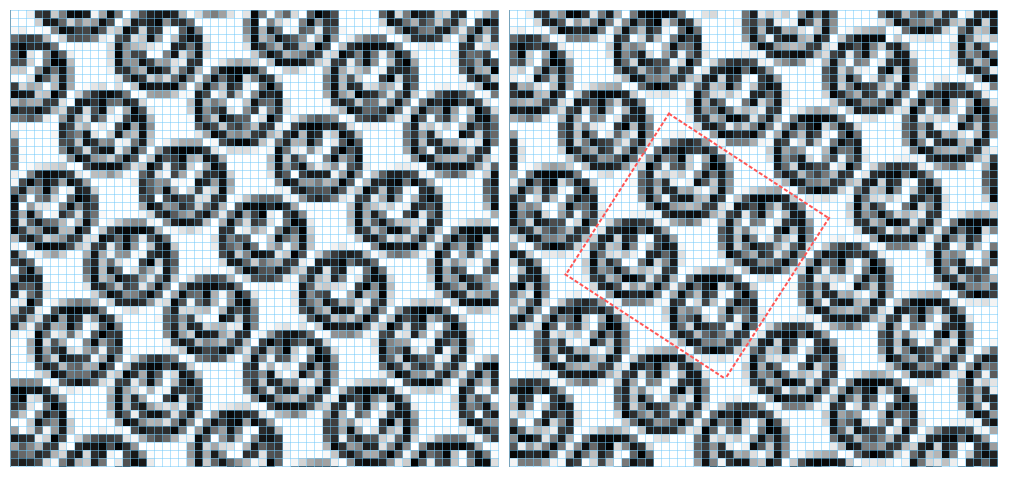
This image shows a pattern fill layer that uses a smiley face image. It is being transformed by scaling to 75% and rotating 34 degrees. On the left no alignment is being applied and on the right the alignment is active and set to every two repetitions, both horizontally and vertically. The blue lines are indicators of the pixel grid and the red ones mark a block of two by two repetitions whose corners are aligned to the pixel grid. Note that, when the alignment is on, then that block is repeated exactly through the image, but when it is off, every instance of the pattern is rendered slightly different.