
Preimpostazioni degli stili
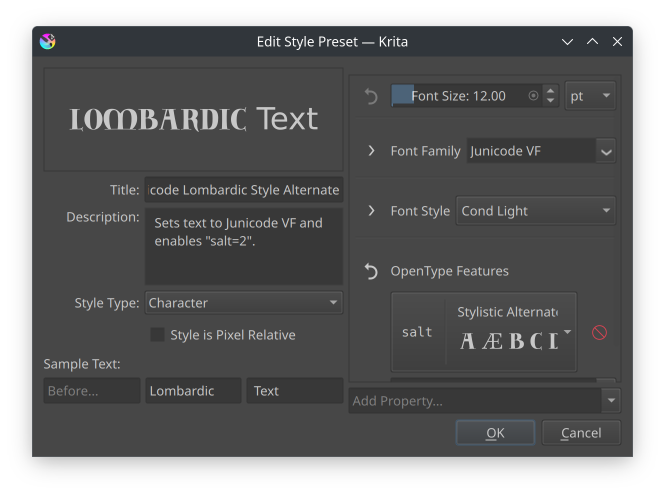
La finestra di dialogo di modifica delle preimpostazioni degli stili.
Le preimpostazioni degli stili ti permettono di memorizzare le proprietà di testo preferite all’interno di una risorsa. Esse si trovano all’interno della Area di aggancio Proprietà del testo, in cui puoi creare preimpostazioni nuove o modificare quelle già esistenti:
- Nome
Il nome della preimpostazione dello stile.
- Descrizione
La descrizione compare come suggerimento quando passi il mouse sopra lo stile.
- Tipo di stile
Le preimpostazioni dello stile possono essere di due tipi: paragrafo o carattere, entrambe decidono quali proprietà saranno disponibili e come l’anteprima verrà generata.
- Lo stile è relativo ai pixel
Per impostazione predefinita, gli stili sono memorizzati in punti, ossia le dimensioni in pixel saranno diverse a seconda della risoluzione di stampa del documento. Attiva questa opzione per fare in modo che lo stile mantenga la stessa dimensione di pixel tra documenti differenti.
Testo d’esempio:
Determina il testo d’esempio utilizzato per visualizzare la preimpostazione.
- Prima
Visibile solo quando il tipo è «carattere». Visualizza del testo predefinito prima del testo attuale.
- Campione
La porzione di campione a cui viene applicata la preimpostazione.
- Dopo
Visibile solo quando il tipo è «carattere». Visualizza del testo predefinito dopo il testo attuale.
- Larghezza e altezza
Visibile solo quando il tipo è «paragrafo». Determina la larghezza e l’altezza del paragrafo in cui è contenuto il campione d’esempio.
Le preimpostazioni degli stili vengono salvate come oggetti di testo SVG semplici con krita:style-type per indicare il tipo, e krita:style-resolution per indicare se è uno stile relativo ai pixel. Gli elementi Titolo e Descrizione SVG sono utilizzati per memorizzare il nome e la descrizione dello stile.