
Stijlvoorinstellingen.
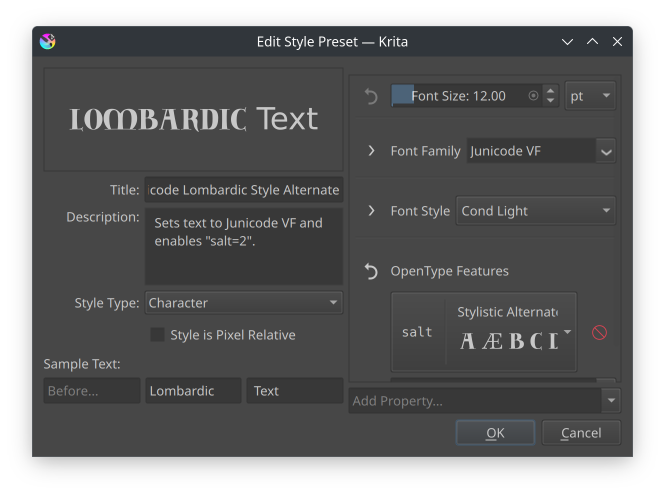
Het dialoogvenster voor stijlen.
Met stijl-voorinstellingen kunnen de voorkeur eigenschappen voor tekst als hulpdata worden opgeslagen. Ze kunnen worden opgezocht in de Paneel voor teksteigenschappen, waar ook nieuwe aangemaakt kunnen worden en bestaande bewerkt:
- Naam
De naam van de stijl-voorinstelling
- Beschrijving
De beschrijving zal als een tool tip verschijnen als de muis er boven zweeft.
- Type stijl
Stijlvoorinstellingen kunnen een van de volgende twee typen zijn: paragraaf of teken, die van invloed zijn op welke eigenschappen beschikbaar zijn en hoe het voorbeeld wordt gegenereerd.
- Stijl is pixelrelatief
Standaard worden stijlen opgeslagen in punten, wat betekent dat de groottes in pixels verschillend zullen zijn afhankelijk van de afdrukresolutie van het document. Schakel dit om te verzekeren dat de stijl dezelfde pixel grootte zal behouden over verschillende documenten.
Voorbeeldtekst:
Bepaalt de voorbeeldtekst die wordt gebruikt om de stijl-voorinstelling te tonen.
- Voor
Alleen zichtbaar bij het type “Teken”. Toont wat gewone tekst voor de geselecteerde tekst.
- Sample
Het gedeelte van de sample waarop de tekst-voorinstelling wordt toegepast.
- Na
Alleen zichtbaar bij het type “Teken”. Toont wat gewone tekst na de geselecteerde tekst.
- Breedte en hoogte
Alleen zichtbaar bij het type “Paragraaf”, bepaalt de breedte en hoogte van de paragraaf waarin de voorbeeldtekst vloeit.
Stijl-voorinstellingen worden als gewone SVG tekstobjecten opgeslagen met krita:style-type om het type aan te geven, en krita:style-resolution om aan te geven of het pixel-relatieve stijl is. SVG Title en Description elementen worden gebruikt om de naam en de omschrijving op te slaan.