图案

此生成器可以向图层填充预设图案或者纹理。预设图案、纹理可以通过设置菜单的资源管理对话框加载到 Krita。图案和纹理可以为你的作品添加质感,如纸张、亚麻布、画布、硬纸板、石面等。例如你可以用在画好的图像上面填充一个画布纹理图层,将它的不透明度调得非常低,这样只有画布的“麻线”能够勉强看清,看上去就好像真的是画在画布一样。

你可以自行制作纹理素材,也可以使用 Krita 社区经验丰富的画师 David Revoy 精心制作的自由免费的纹理包:(https://www.davidrevoy.com/article156/texture-pack-1)。

变形

Added in version 4.4.

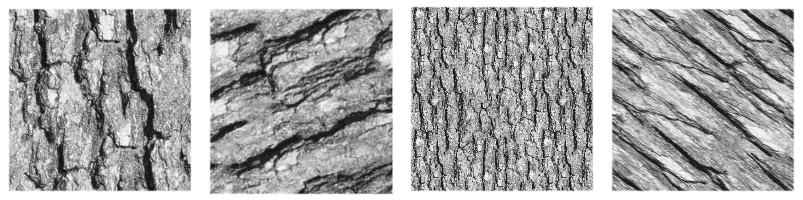
变形标签页可以对填充的图案进行变形处理,例如缩放和旋转等。
../../../_images/pattern_fill_transform.png

上面组图显示了不同变形应用在同一张纹理图像上的效果对比。

Align to pixel grid

Added in version 5.3.

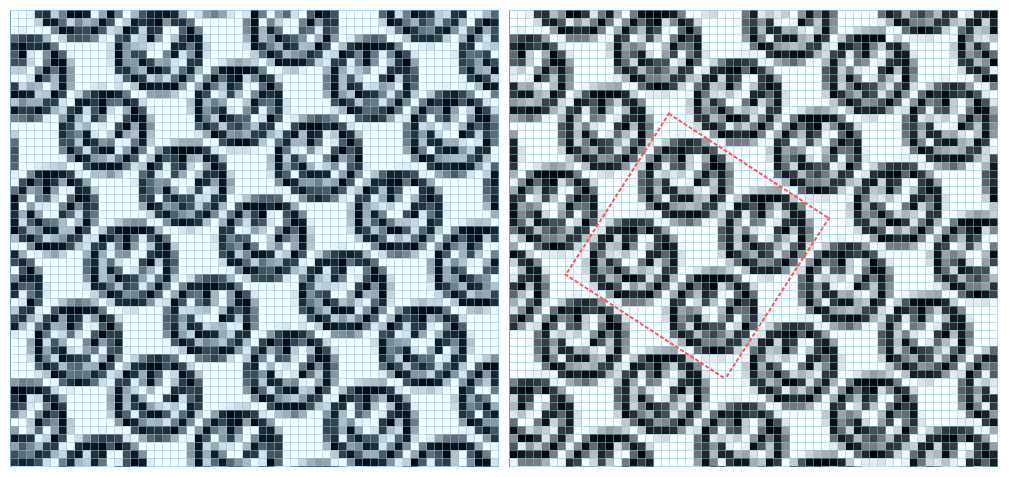
When a geometric transformation is applied to a pattern, the corners of the repeated image may be displaced to any new position, including fractional coordinates (sub-pixel, non integer coordinates). This is the default behavior and it is fine most of the times. But there are times when it is desirable that the corners end up at integer coordinates. For example when exact repeatability with pixel accuracy is needed. This can be achieved by checking the align to pixel grid option. By doing so, the pattern corners are ensured to fall at integer coordinates after the transformation.

Keep in mind that this alignment reduces the number of possible transformations (in fact, all those transformations that map the corners to fractional coordinates are removed), but the aligned transformation will approximate the un-aligned one as close as possible. There is also the possibility of setting this alignment over a number of repetitions of the pattern the corners should be aligned.

This option is especially useful when dealing with small patterns, for example those used for screentones, or when the pattern is scaled down to be really small, since it helps reducing some artifacts like moiré patterns.

../../../_images/pattern_fill_align_pixel_grid.png

This image shows a pattern fill layer that uses a smiley face image. It is being transformed by scaling to 75% and rotating 34 degrees. On the left no alignment is being applied and on the right the alignment is active and set to every two repetitions, both horizontally and vertically. The blue lines are indicators of the pixel grid and the red ones mark a block of two by two repetitions whose corners are aligned to the pixel grid. Note that, when the alignment is on, then that block is repeated exactly through the image, but when it is off, every instance of the pattern is rendered slightly different.