
Style Presets
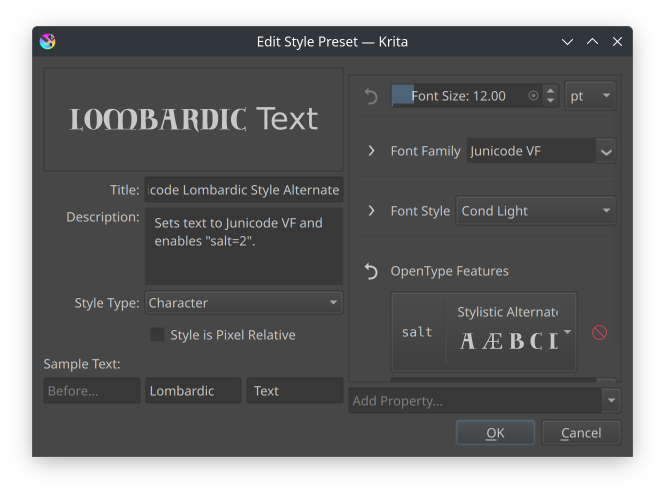
The style preset edit dialog.
Style presets allow you to store prefered text properties into a resource. They can be found inside the Text Properties Docker, where you can also create new ones or edit preexisting ones:
- Name
The name of the style preset.
- Description
The description will appear as a tool tip while hovering over the style.
- Style Type
Style Presets can be one of two types: paragraph or character, which decides both which properties will be available as well as how the preview is generated.
- Style is Pixel Relative
By default, styles are stored in points, meaning that the sizes in pixels will be different depending on document print resolution. Toggle this to ensure the style will maintain the same pixel size across different documents.
Sample Text:
Determines the sample text used to display the style preset.
- Before
Only visible when the type is “character”. Displays some default text before the current text.
- Sample
The portion of the sample that the preset is applied to.
- After
Only visible when the type is “character”. Displays some default text after the current text.
- Width and Height
Only visible when type is “paragraph”, determines the width and height of the paragraph that the sample is flowed into.
Style presets are saved as simple SVG text objects with krita:style-type added to indicate the type, and krita:style-resolution to indicate whether it is a pixel-relative style. SVG Title and Description elements are used to store the name and description.