
Desen Dolgu
Bu, katmanı, Özkaynak Yönetimi arabirimi yoluyla Krita’ya yüklenmiş olan önceden tanımlanmış bir model veya doku ile doldurur. Desenler, çiziminize veya resminize doku eklemenin basit ve ilginç bir yolu olabilir ve sulu boya kağıdı, keten, tuval, sunta, taş veya sonsuz sayıda başka seçeneğin görünümünü yeniden yaratmanıza yardımcı olabilir. Örneğin, sayısal bir tabloyu alıp tuval üzerindeymiş gibi bitirmek istiyorsanız aşağıdaki doku paketinden Tuval dokusuna sahip bir Dolgu Katmanı ekleyebilir ve matlığı çok düşük ayarlayabilirsiniz; böylece desenin “iplikleri” pek belirsiz görünür. Etkisi oldukça inandırıcıdır.
Kendinizinkini oluşturabilir ve bunları da kullanabilirsiniz. İyi tasarlanmış ve kullanışlı desenlerden oluşan harika bir küme için favori sanatçılarımızdan biri ve Krita’nın iyi bir arkadaşı olan David Revoy’un ücretsiz doku paketine göz atın (https://www.davidrevoy.com/article156/texture-pack-1).
- Dönüşüm
Added in version 4.4.
Bu, model üzerinde ölçekleme veya döndürme gibi bir dizi dönüşüm seçeneğinin ayarlanmasına olanak tanır.
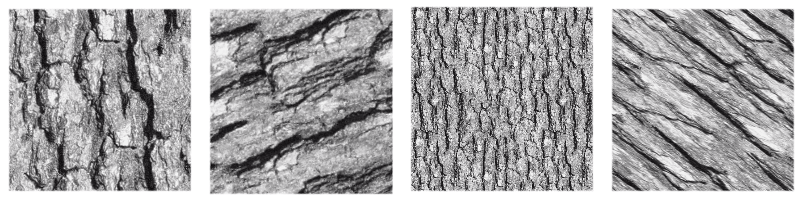
Tek bir dokuya uygulanan birkaç dönüşümü gösteren görsel.
- Piksel ızgarasına hizala
Added in version 5.3.
Bir desene geometrik bir dönüşüm uygulandığında, yinelenen görselin köşeleri, kesirli koordinatlar (alt piksel, tamsayı olmayan koordinatlar) içerilmek üzere herhangi bir yeni konuma kaydırılabilir. Bu öntanımlı davranıştır ve çoğu zaman sorun teşkil etmez. Ancak köşelerin tamsayı koordinatlarında sonuçlanmasının istendiği zamanlar vardır. Örneğin, piksel hassasiyetinde tam yinelenebilirlik gerektiğinde. Bu, Piksel ızgarasına hizala seçeneği işaretlenerek elde edilebilir. Bu sayede, dönüşümden sonra desen köşelerinin tamsayı koordinatlarına düşmesi sağlanır.
Unutmayın ki bu hizalama, olası dönüşüm sayısını azaltır (aslında, köşeleri kesirli koordinatlara eşleyen tüm dönüşümler ortadan kalkar); ancak hizalanmış dönüşüm, hizalanmamış olana olabildiğince yakın bir şekilde yaklaşacaktır. Ayrıca, köşelerin hizalanması gereken desenin yineleme sayısı üzerinden bu hizalamayı ayarlama olasılığı da vardır.
Bu seçenek, özellikle küçük desenlerle uğraşırken, örneğin ekran tonları için kullanılan desenlerde veya desen gerçekten küçük boyutlara küçültüldüğünde, moiré desenleri gibi bazı bozulmaları azaltmaya yardımcı olduğu için oldukça kullanışlıdır.
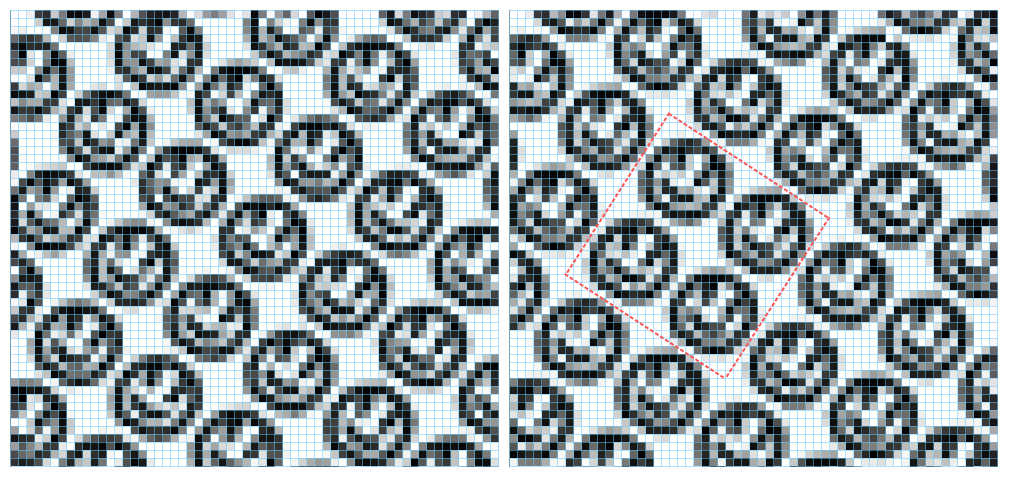
Bu görsel, gülen yüz görseli kullanan bir desen dolgu katmanını göstermektedir. Resim %75 oranında ölçeklendirilerek ve 34 derece döndürülerek dönüştürülmüştür. Solda hizalama uygulanmamış, sağda ise hizalama etkin ve hem yatay hem de dikey olarak her iki yinelemede bir olacak şekilde ayarlanmıştır. Mavi çizgiler piksel ızgarasının göstergeleridir ve kırmızı çizgiler köşeleri piksel ızgarasına hizalanmış ikiye iki yinelemeden oluşan bir bloku işaretler. Hizalama açık olduğunda, bu blok görselin tamamında tam olarak yinelenir; ancak kapalı olduğunda, desenin her örneği biraz farklı şekilde oluşturulur.